GPU Server for Machine Learning: How to Choose the Right One
Training a model on a normal CPU server can take days. The same job on a GPU can take hours. That’s why a GPU server for machine learning has become the default choice for AI teams, students and startups.
But GPU servers aren’t cheap, and the options can feel confusing. This guide explains what to look for in plain words, so you don’t pay for power you won’t use.
Why GPUs are used for machine learning
A CPU is great at doing a few things quickly, one after another. A GPU is built to do thousands of small calculations at the same time. Machine learning is mostly big piles of small calculations, which is exactly what a GPU is good at.
So for training models, running image or video AI, or serving a chatbot, a GPU does the same work much faster.
Dedicated Server Plans
Arise Dedicated Servers deliver powerful performance, reliable infrastructure, and flexible resources for businesses, high-traffic websites, applications, and demanding workloads.
How much VRAM for machine learning?
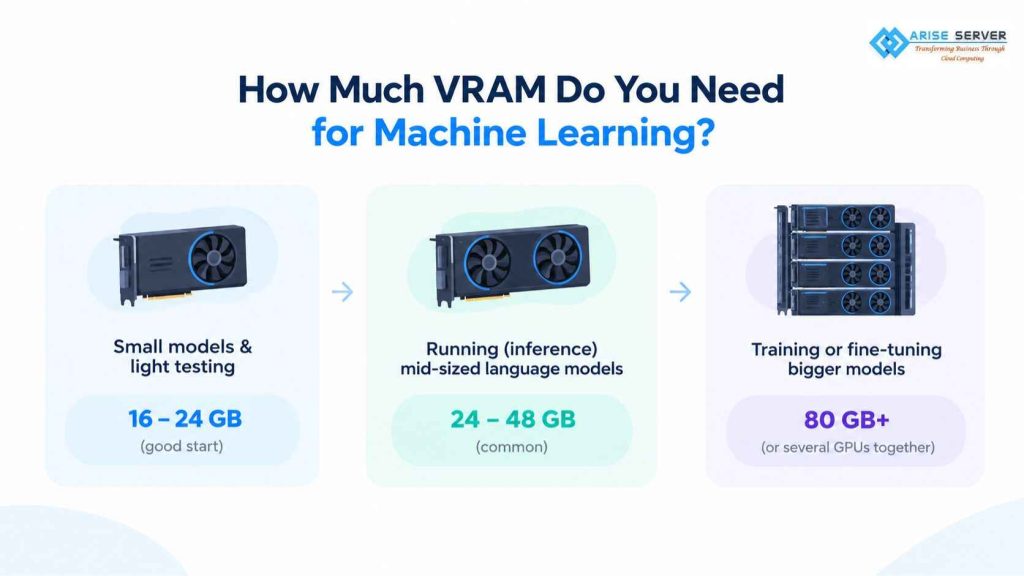
VRAM is the memory on the GPU itself. It’s the number that decides what you can run, so check it first.
A simple way to think about it:
- Small models and light testing: around 16 to 24 GB is a good start
- Running (inference) mid-sized language models: 24 to 48 GB is common
- Training or fine-tuning bigger models: 80 GB or more, or several GPUs together
Training needs a lot more memory than running a model, often several times more. If you run out of VRAM, the job either fails or slows to a crawl.
GPU server for AI training vs inference
These two jobs need different things.
Training teaches the model. It needs lots of VRAM, fast storage and often more than one GPU. It’s heavy but it usually runs for a limited time.
Inference is when the model answers real users. It needs steady, reliable performance, and it runs all the time. A smaller GPU is often enough here.
Know which one you’re doing before you choose. Many teams train on a big rented GPU for a short time, then run inference on something smaller.
Read Also: FinOps for Hosting: How to Stop Overpaying for Infrastructure You’re Not Using
Cloud GPU vs dedicated GPU server
| Cloud GPU | Dedicated GPU server | |
| Setup | Quick, pay as you go | Fixed monthly plan |
| Best for | Testing, short training runs, changing workloads | Long training, 24/7 inference, steady use |
| Control | Virtual machine | Full hardware access |
| Cost over time | Can add up if left running | Often better for constant use |
If you’re experimenting or training for a few days, cloud GPU is easy and flexible. If your model runs all day, every day, a dedicated GPU server usually works out better over a few months. You can see what we offer on our GPU cloud server page.
Should you rent a GPU server for AI?
For most people, yes, at least at first. Buying GPUs means a large upfront cost, power, cooling and hardware that gets old quickly. New models come out every year.
Renting lets you try different setups, scale up when a project gets serious and stop when it ends. You only buy hardware if you’re sure you’ll use it hard for years.
VPS Server Plans
An ideal VPS solution for modern projects combines strong security, high-speed performance, and flexible, scalable configurations to match your evolving requirements.
What else to check besides the GPU
The GPU isn’t the whole story. Look at these too:
- CPU and RAM: a weak CPU can hold back a strong GPU
- Storage: NVMe SSDs load big datasets much faster than older drives
- Network speed: important if you move large files or use more than one server
- Support: when a driver breaks at 2 a.m., a real person to call matters
- Location: pick a data center close to your users or your team

A simple way to decide
- Write down the model size you plan to use
- Check how much VRAM it needs
- Decide if you’re training, running, or both
- Start with the smallest GPU that fits, and move up only if you need to
If you’d like help matching a GPU to your project, our team can look at it with you before you commit.
FAQ’s
Visit Our Other VPS Server Locations
Explore our global VPS server locations with high performance, full root access, enterprise-grade security, and scalable hosting solutions for your business.