
What Is a CDN? A Beginner’s Guide to Content Delivery Networks
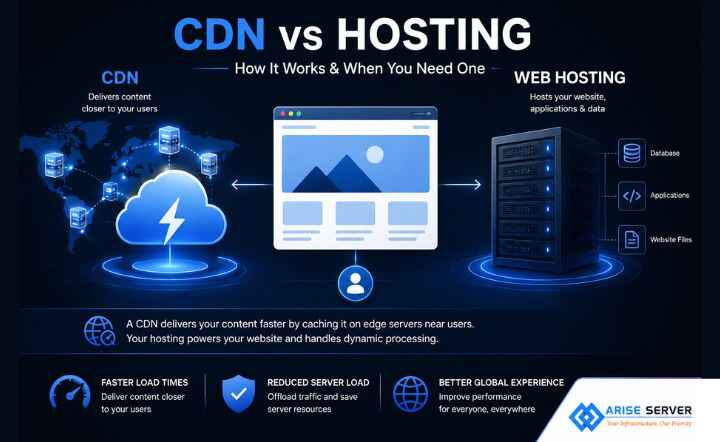
Let’s begin with clearing the misconception that a CDN vs hosting is not a replacement for web hosting; rather, it works alongside your hosting infrastructure to deliver content closer to users. Your website might be perfectly healthy, yet the physical distance between the user and the server can still affect how quickly content reaches the browser.
That is when content delivery network comes in. When someone visits your website, their browser needs to retrieve resources like HTML, images, stylesheets, JavaScript, fonts, and sometimes video or other media. So if your website is hosted on a single origin server, requests might have to travel considerable distances before that content reaches the user. Where your hosting environment, like a VPS, dedicated server, or cloud server, provides the origin infrastructure where your website, applications, databases, and server-side processes run, the difference lies in the fact that a CDN helps deliver its content closer to your users while web hosting runs your website.
Having said that, how does a CDN vs hosting actually know where to send a user’s request? What happens when the requested content is not already cached? And does using a CDN automatically make a website faster? This blog helps break down the same and explain how Content Delivery Networks work, CDN vs. hosting in practical terms, explore origin infrastructure, and help you understand when adding a CDN can make sense.
What is a CDN?
Primarily, a content delivery network (CDN) is a distributed network of servers that delivers cached website content from locations closer to users, so instead of every request traveling back to the website’s origin server, a CDN can serve cacheable files like images, CSS, JavaScript, and other assets from an edge location.
Apart from that basic idea of CDN, here’s what CDN stands for:
- Content: It refers to website resources like images, CSS, JavaScript, fonts, and other files
- Delivery: It indicates to getting those resources to a user’s browser
- Network: It refers to the distributed servers or edge locations used to deliver them.
Additionally, the role of a CDN vs hosting is to primarily improve how cacheable content is delivered. So when a user requests a resource, the request reaches the CDN, then the CDN checks whether the content is already cached, and if it is a cache hit, the CDN can serve it from an edge location, and if it is a cache miss, the CDN can retrieve it from the origin. Which reduces latency, repeated origin requests, and the workload associated with delivering frequently requested content. While common CDN content includes images, CSS files, JavaScript, fonts, static HTML, downloads, and certain video and media assets. In short, a CDN is a delivery layer that works alongside your hosting infrastructure and not just a replacement for it.
VPS Server Plans
An ideal VPS solution for modern projects combines strong security, high-speed performance, and flexible, scalable configurations to match your evolving requirements.
How does a CDN work?
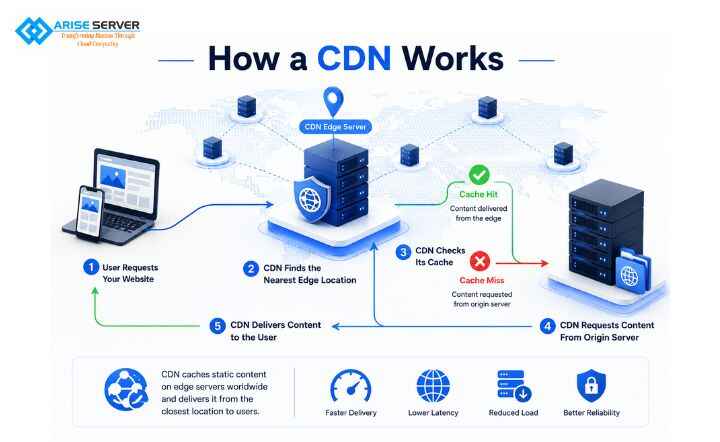
When someone opens your website, the request has a journey to make, but instead of sending every request all the way back to your origin server, a CDN can step in along the way to check whether the requested content is already available at the edge and deliver it from there.
Where a CDN works by placing a network of edge servers between your users and your website’s origin server, here the process is relatively simple:
- A user request your website
- The CDN identifies the appropriate edge location
- The CDN checks its cache
- The CDN requests content from the origin
- The CDN delivers the content
So instead of making every customer travel back to the warehouse for every commonly requested item, the distribution points can keep copies of frequently requested items closer to them. Having said that, not every request follows the same path; be it dynamic, personalized, or non-cacheable, content might still require origin processing.
Here’s a a visual diagram representation of how a CDN works:
User
↓
CDN Edge Server
↙ ↓ ↘
User A, User B, User C
↓
Cache Miss?
↓
Origin Server
↓
Website Content
CDN vs. hosting: What’s the difference?
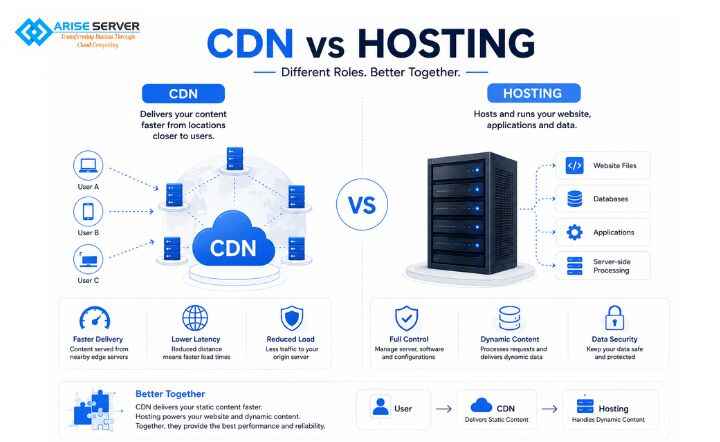
Now if we come down to the difference between CDN vs. hosting, it is essential to know that both servers have a different purpose while working together.
| PARAMETERS | WEB HOSTING | CDN |
| Primary purpose | Run and stores website infrastructure | Delivers cachable content |
| Main infrastructure | Origin server | Distributed edge servers |
| Hosts application | Yes | Usually no |
| Hosts database | Yes | No |
| Handles server-side processing | Yes | No |
| Caches static content | Might | Core function |
| Global edge delivery | Usually limited | Core function |
Can a CDN replace your hosting?
No, primarily a CDN does not replace your web hosting; rather, they are designed to work together. In fact, your hosting server is where your website lives and runs, so it provides the infrastructure needed for your application, databases, server-side code, APIs, files, and other workloads.
Having said that, your hosting environment handles website and application files, databases, server-side processing, APIs, dynamic requests, application logic, and user-specific content. Whereas a CND handles commonly cached server images, CSS, downloads, and other cacheable resources.
Why use them together?
The whole point of using a CDN and hosting environment is because a CDN handles eligible content at the edge, where a CDN can complement your hosting, but it generally doesn’t replace the infrastructure running your website.
Read More: How to Secure a Linux Server: A Step-by-Step Hardening Checklist
What are the benefits and limitations of using a CDN?
No doubt that a CDN vs hosting can make your website delivery faster, more efficient, and more resilient; however, it comes with significant limitations as well.
Here are both benefits and limitations of using a CDN:
| BENEFITS | LIMITATIONS |
| ⦁ Faster content delivery ⦁ Lower origin server load ⦁ Better performance for global visitors ⦁ Better handling of traffic spikes ⦁ Additional security capabilities | ⦁ Doesn’t fix a slow origin ⦁ Everything cannot be cached ⦁ Cache configuration matters ⦁ CDNs don’t guarantee faster websites ⦁ Adds another infrastructure layer |
Dedicated Server Plans
The ideal solution for large-scale projects delivers strong security, top-level performance, and customizable configurations.
Conclusion
In conclusion, CDN vs. hosting is not a replacement for either; your hosting provides the infrastructure that runs your website, while CDN helps deliver cacheable content closer to your users. Hence, understanding where the CDN fits in your architecture is the first step toward using it effectively.

FAQ’s
Visit Our Other VPS Server Locations
Explore our global VPS server locations with high performance, full root access, enterprise-grade security, and scalable hosting solutions for your business.