
CXL Memory Expansion Explained: Adding RAM Beyond DIMM Slots
For decades, the amount of RAM a server could hold was fixed by its motherboard. A CPU has a set number of memory channels, each channel has a few DIMM slots, and each slot takes a module of a certain size. When you filled them, you were done. If you needed more memory, you bought a bigger server.
CXL changes that. It lets a server add memory over the same kind of connection used by graphics cards and NVMe drives. In 2026, with DRAM prices up sharply and AI workloads hungry for memory, CXL has moved from research papers into real data centres.
This article explains what CXL memory is, how it performs compared with normal RAM, how Linux uses it, and when it actually makes sense.
What CXL is
CXL stands for Compute Express Link. It’s an open standard built on top of PCIe, the high-speed connection inside every modern server. PCIe on its own is great for moving bulk data to devices like SSDs. What it doesn’t provide is cache coherency: a guarantee that the CPU and the device see the same, up-to-date view of shared memory.
CXL adds that. It defines three protocols that run over the PCIe physical layer:
- CXL.io for device discovery and setup (essentially PCIe)
- CXL.cache so devices can cache host memory coherently
- CXL.mem so the CPU can read and write memory that sits on a device
There are also three device types. For this article, the one that matters is Type 3: memory expanders. A Type 3 device is basically a controller plus DRAM, plugged into a CXL-capable slot. The CPU treats that DRAM as part of system memory.
VPS Server Plans
An ideal VPS solution for modern projects combines strong security, high-speed performance, and flexible, scalable configurations to match your evolving requirements.
What it looks like in a server
CXL memory comes in a few physical forms:
- E3.S modules, the same drive-style form factor used for some NVMe SSDs, sliding into the front of the server
- Add-in cards that go into a PCIe/CXL slot and hold their own DIMMs
- External memory boxes connected to several servers through a CXL switch (still early)
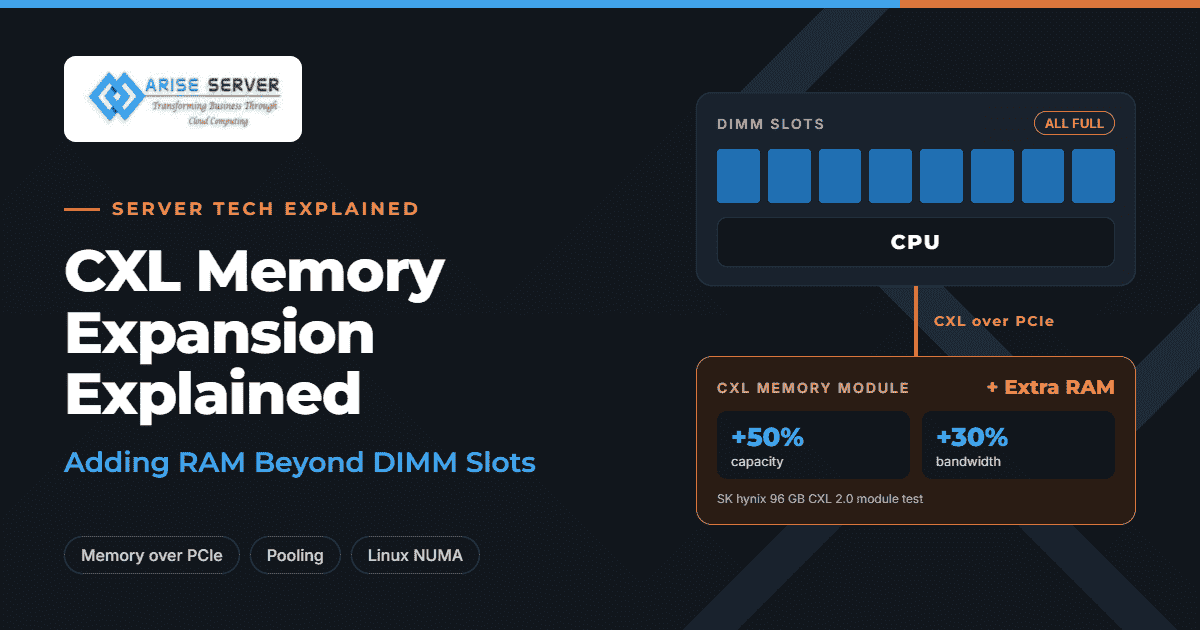
Capacities are already meaningful. SK hynix reported that its 96 GB CXL 2.0 module raised a server’s memory capacity by 50% and bandwidth by 30%. Samsung has announced 256 GB CXL modules. Controllers from companies like Astera Labs support up to 2 TB of memory each.
CXL needs CPU support. Server platforms from Intel and AMD from the last few generations include it, so this isn’t exotic hardware anymore, though not every server or motherboard exposes it.
CXL 1.1, 2.0 and 3.x: what each adds
The versions describe what you can do with the memory, not just speed:
| Version | Main use | In plain terms |
| CXL 1.1 | Direct-attached expansion | Plug memory into one server and use it there |
| CXL 2.0 | Pooling through a switch | Several servers draw from a shared pool, each owning a slice at a time |
| CXL 3.x | Sharing and fabrics | Multiple servers can access the same memory, across larger networks of devices |
Today, almost all real deployments are the first kind: direct-attached expansion. Pooling is being tested. Sharing is further out. Microsoft’s 2026 research on CXL in its cloud describes exactly this path: get expansion solid first, try small-scale pooling next, then move to sharing as the ecosystem matures.
How fast is CXL memory?
This is the most important question, and the answer is: slower than local RAM, but closer than you might expect.
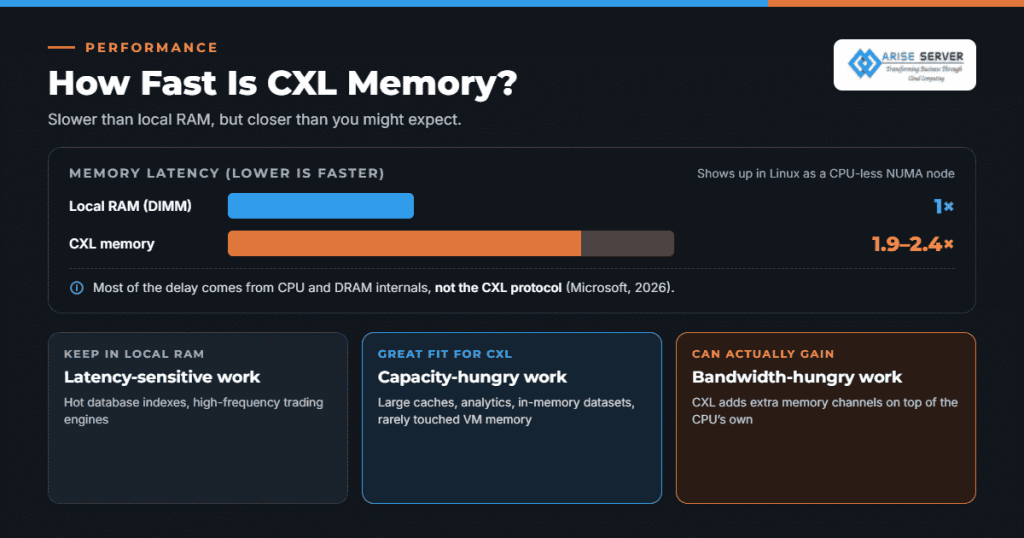
To the operating system, CXL memory shows up as a CPU-less NUMA node. In a normal dual-socket server, memory attached to the other CPU is a “remote” NUMA node and is slower to reach. Research testing several real CXL expansion cards found that CXL memory behaves like a NUMA node two hops away. Another study measured CXL latency at roughly 1.9 to 2.4 times that of local memory.
Where does the delay come from? You might assume the CXL protocol itself. Microsoft’s 2026 paper, published in IEEE Transactions on Computers, found otherwise: CPU and DRAM internals, not the CXL protocol, account for most of the latency and its variability.
What this means in practice:
- Latency-sensitive work (a hot database index, a high-frequency trading engine) should stay in local RAM.
- Capacity-hungry work with lots of cooler data (large caches, analytics, in-memory datasets, VM memory that’s rarely touched) can live on CXL with little noticeable slowdown.
- Bandwidth-hungry work can actually gain, because CXL adds extra memory channels on top of the CPU’s own.
Read Also: How to Right-Size RAM on a Server When Memory Gets Expensive
How Linux uses CXL memory
Modern Linux kernels support CXL natively. Once the hardware is set up, you can see the new node:
numactl --hardwareYou’ll see a node with memory but no CPUs listed. The cxl command-line tool, part of the ndctl project, shows CXL devices and regions:
cxl list -M -RFrom there, you have a few ways to use it.
Let the kernel tier memory. Linux can treat local RAM as the fast tier and CXL as the slower tier, moving “hot” pages up and “cold” pages down automatically. This uses NUMA balancing in tiering mode:
sudo sysctl kernel.numa_balancing=2
echo 1 | sudo tee /sys/kernel/mm/numa/demotion_enabled
Interleave pages. For bandwidth-heavy workloads, spreading pages across local and CXL nodes can raise total throughput.
Bind specific workloads. You can place an entire process on a chosen node:
numactl --membind=2 ./my-analytics-jobThere’s a surprise in the research, though. Several studies found that fancy page-migration schemes often lose to Linux’s simple default behaviour (“first touch”) with CXL, because the latency gap is small enough that moving pages back and forth costs more than it saves. The practical advice: start with defaults, measure, and only add tiering or interleaving if it clearly helps your workload.
In virtualised environments, hypervisors can give VMs memory from the CXL node, which is one way clouds use it to offer large-memory instances.
Why CXL matters more in 2026
Three things pushed CXL forward this year.
DRAM got expensive. Server DRAM contract prices rose more than 60% in Q1 2026 alone. CXL doesn’t make DRAM cheaper, but it gives more options. One documented approach connects recycled, older-generation DRAM through CXL as a cheaper second tier, providing 20–30% of a server’s total memory. Instead of buying all-new high-density DIMMs, operators reuse what they have.
Memory stranding. In cloud and VPS environments, a lot of RAM sits allocated but unused, because VMs rarely use everything they’re given. Microsoft’s earlier Pond research showed that pooling memory across servers with CXL could reduce how much DRAM a data centre needs in total. Less stranded memory means fewer gigabytes to buy at 2026 prices.
AI needs capacity. AI inference with long contexts keeps large caches in memory. GPUs have their own fast HBM, but system RAM holds model weights during loading, embeddings, vector databases and caches around the GPU. More capacity per server, without moving to bigger and pricier platforms, is appealing. We looked at why many businesses are moving AI workloads onto dedicated hardware in why these 10 businesses ditched shared cloud for dedicated AI infrastructure.
Industry reports describe CXL adoption reaching an inflection point between late 2025 and early 2026, with large cloud providers offering memory-heavy virtual machines that use CXL-attached memory behind the scenes.
CXL vs adding more DIMMs
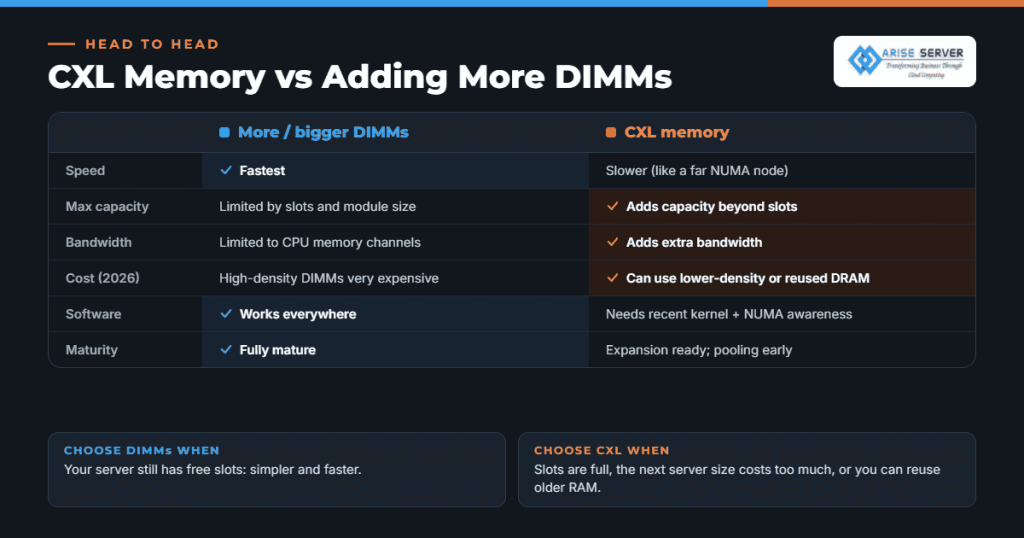
| Question | More / bigger DIMMs | CXL memory |
| Speed | Fastest | Slower (like a far NUMA node) |
| Max capacity | Limited by slots and module size | Adds capacity beyond slots |
| Bandwidth | Limited to CPU memory channels | Adds extra bandwidth |
| Cost | High-density DIMMs are very expensive in 2026 | Can use lower-density or reused DRAM |
| Software | Works everywhere | Needs a recent kernel and NUMA awareness |
| Maturity | Fully mature | Expansion is ready; pooling is early |
If your server still has free DIMM slots, filling them is simpler and faster. CXL becomes interesting once slots are full, when the jump to the next server size is expensive, or when you can reuse older memory.
Dedicated Server Plans
Arise Dedicated Servers deliver powerful performance, reliable infrastructure, and flexible resources for businesses, high-traffic websites, applications, and demanding workloads.
Who should care right now
CXL is worth a look if you run:
- In-memory databases and caches that have outgrown their servers
- Analytics engines and large search indexes
- Virtualisation hosts packing many VMs, especially with uneven memory use
- AI inference servers with large embedding stores or long-context caches
- HPC jobs that are bandwidth-limited
For a typical website, mail server or small application, CXL adds complexity you don’t need. A properly sized server with ordinary RAM is cheaper and simpler. If you’re not sure how much memory you really use, measure first. Our guide to right-sizing RAM on a server walks through it. (Link to Blog 2 once published.)

Things to check before you buy
- CPU and motherboard support. Not every server with a recent CPU exposes CXL slots.
- Kernel version. Use a recent LTS kernel with CXL and memory tiering support.
- Workload fit. Test with your real application. Latency-sensitive code may slow down.
- Monitoring. Make sure your tools show per-NUMA-node memory use, or you won’t see what’s happening.
- Vendor maturity. Expansion devices are shipping now. Pooling switches and shared memory are early, so treat them as pilots.
If you’re planning memory-heavy infrastructure, start from the right base. Our bare metal hosting guide explains why full hardware control matters for this kind of tuning. Arise high-grade servers and dedicated servers cover large-memory configurations. For AI work, see our guide to choosing a GPU server for machine learning, and if you’d rather not manage hardware at all, private cloud hosting gives you dedicated resources without the hardware decisions.
FAQ’s
Visit Our Other VPS Server Locations
Explore our global VPS server locations with high performance, full root access, enterprise-grade security, and scalable hosting solutions for your business.