Most security advice treats vulnerabilities one at a time. This one is critical, patch now. That one is local only, patch next month. In October 2026, attackers showed why that way of thinking falls apart.
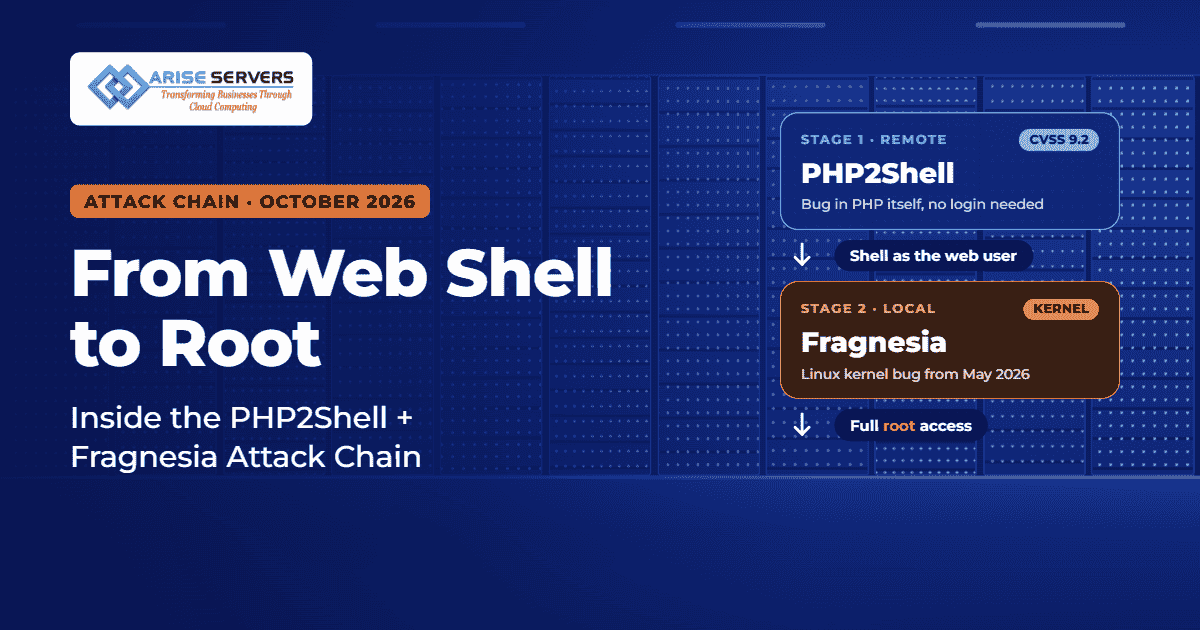
They took PHP2Shell, a remote bug in PHP itself, and used it to get a foothold on web-facing servers as the web user. Then they used Fragnesia, a Linux kernel bug from back in May, to turn that foothold into full root. Two bugs, rated very differently, and together they produced the worst possible result.
This post walks through the chain one stage at a time, explains why each stage worked, and sets out the order of work a defender should follow, including the step most people get wrong.
The timeline
The dates matter here, because several of them are uncomfortable.
- October 17: Amazon’s MadPot honeypots record an exploitation attempt against the PHP bugs. That’s four days before public disclosure.
- October 21, about 02:00 UTC: Public proof-of-concept code appears, around twelve hours before the planned embargo lift.
- October 21, 14:00 UTC: The PHP project ships fixed releases: 8.5.12, 8.4.27, 8.3.36 and 8.2.35. Source backports are also published for the unsupported 7.4, 8.0 and 8.1 branches.
- October 26: CISA adds both PHP2Shell CVEs to its Known Exploited Vulnerabilities catalogue.
- Late October: Dream Security reports a campaign that chained PHP2Shell with Fragnesia. It counts 25 breached servers, including three linked to the US government. Other counts differ.
If your PHP servers were online on October 17, patching on the 21st doesn’t prove you were never hit. That’s why several incident-response guides recommend checking logs back to the 17th.
Dedicated Server Plans
Arise Dedicated Servers deliver powerful performance, reliable infrastructure, and flexible resources for businesses, high-traffic websites, applications, and demanding workloads.
Stage 1: PHP2Shell gets the attacker in
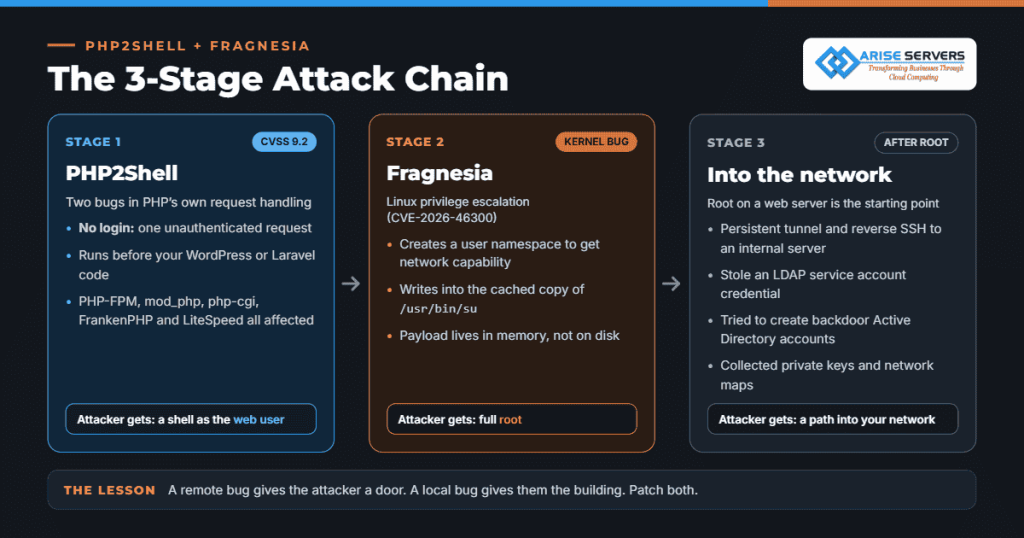
PHP2Shell is the nickname for two vulnerabilities, both rated CVSS 9.2.
CVE-2026-109618 is an out-of-memory problem. If PHP runs out of memory at just the wrong moment, it can stop while some request data is only half set up. The cleanup code that runs afterwards can then treat that half-built data as valid. That kind of mismatch is what memory-corruption exploits feed on.
CVE-2026-109619 is about leftovers between requests. A PHP worker process handles many requests one after another. Some internal state that belonged to one request could survive after its memory was freed, and the next request handled by the same worker could use that stale state before it was reset.
Three things made these bugs especially dangerous:
- No login needed. Reporting described a working exploit as needing a single unauthenticated request.
- It happens before your application runs. The bug is in PHP’s own request handling. It doesn’t matter how carefully your WordPress plugins or Laravel code are written. The vulnerable code runs first.
- It affects every way PHP serves the web. PHP-FPM, Apache with mod_php, php-cgi, FrankenPHP and LiteSpeed were all listed as affected. mod_php setups were described as the most at risk, since PHP runs inside the Apache process itself.
The exploit chain itself was reportedly complex, but AI models helped lower that bar. Dream Security said the attackers used AI-assisted tooling, though not fully autonomous agents.
At the end of stage 1, the attacker can run commands on the server as the web service account, usually www-data, apache or nginx. That’s bad, but on a well-separated server it’s not yet the end. The web user shouldn’t be able to read other users’ files, change system binaries or touch the kernel.
That’s what stage 2 is for.
Stage 2: Fragnesia turns the web user into root
Fragnesia (CVE-2026-46300) was disclosed on May 13, 2026, with a public proof of concept on the same day. It’s a local privilege escalation in the kernel’s IPsec ESP-in-TCP code. We explain how it works in our post on page-cache exploits, but here’s the short version:
- An unprivileged user creates a user namespace, which most distributions allow by default, to get the network capability the bug needs.
- They use the ESP-in-TCP code path to make the kernel write into the page-cache copy of a file they can only read, such as
/usr/bin/su. - The cached
sunow does what the attacker wants. Running it gives root.
In the October campaign, a researcher noted that the kernel bug “writes its payload into the page cache rather than to disk.” That one detail changes how you have to respond. More on that below.
Why did a five-month-old kernel bug still work? Partly because Fragnesia arrived just days after Dirty Frag, and the Dirty Frag patches didn’t fix it. Some admins installed the first kernel update, felt covered, and never noticed they needed a second one. Others filed Fragnesia under “local only, lower priority.” On a server that runs PHP for the public internet, “local” means “one web bug away.”
Stage 3: what happened after root
Dream Security’s description of what the attackers did next is worth reading closely, because it shows root on a web server isn’t the goal. It’s the starting point.
- They built a persistent tunnel into the internal network within hours.
- They set up a reverse SSH tunnel to an internal management server.
- They recovered an LDAP service account credential.
- They enumerated domain users and groups, sprayed passwords, and tried to create backdoor Active Directory accounts.
- They collected private keys and network topology data.
One high-profile target group was Palo Alto Networks firewalls running vulnerable PAN-OS builds, where root was reportedly reached in a single HTTP request. Palo Alto later said all PAN-OS and Panorama versions were affected by PHP2Shell, with fixed releases still pending at the time. Network appliances run PHP more often than people realise.
The lesson for a regular business: whatever secrets a web server can reach, the attacker can reach too. Database passwords in wp-config.php, API keys in .env files, SSH keys for deployment, and directory credentials for single sign-on are all in scope.
Read Also: CVE-2026-98432: Patching a 9.8 Linux TCP Bug Without Downtime
Why the chain beats “patch the critical one first”
Look at the two bugs as a typical patch queue would see them:
| PHP2Shell | Fragnesia | |
|---|---|---|
| Type | Remote code execution | Local privilege escalation |
| Score | CVSS 9.2 | CVSS 7.8 (estimated) |
| Login needed | No | Needs a local shell |
| Typical priority | Emergency | Next maintenance window |
Seen separately, the triage looks sensible. Seen together, the local bug is what turns an incident affecting one website into a full server takeover. Any server that runs code reachable from the internet should treat kernel privilege-escalation bugs as urgent. We go into this in more depth in the pillar post, The 30-Minute Patch Window [pillar link].
The defender’s order of work
Find every PHP install.
Check the package version.
Capture memory before rebooting.
Patch PHP and restart workers.
Patch the kernel or unload the esp4, esp6 and rxrpc modules.
Rotate secrets.
Hunt for signs of the attack from October 17.
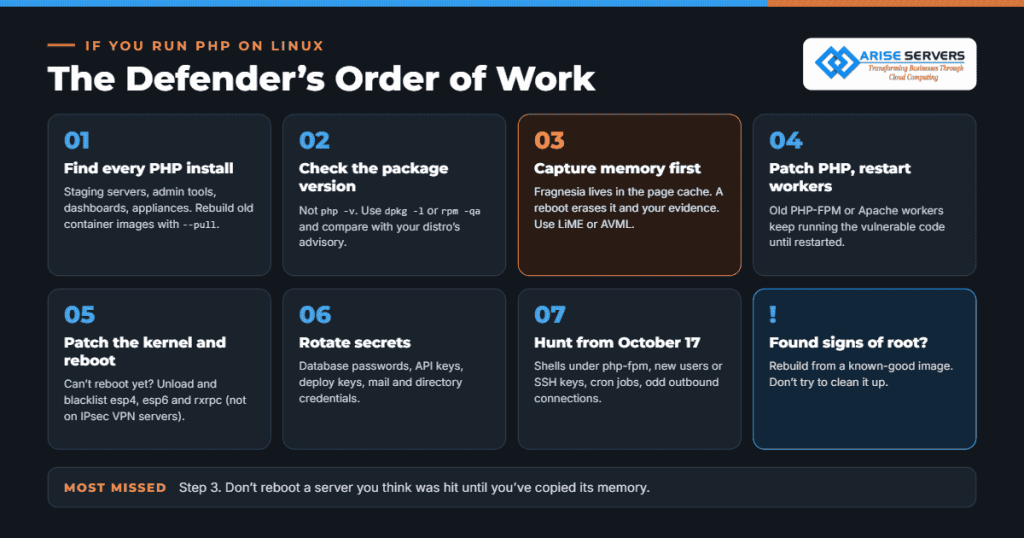
Here’s the order to follow if you run PHP on Linux and haven’t fully dealt with both bugs. The order matters.
1. Find every PHP install, including the forgotten ones. Old staging servers, admin tools, monitoring dashboards and appliance web interfaces all count. Check container images too. The official php Docker images were rebuilt on October 21, but images you built earlier still carry the old runtime until you rebuild with --pull.
2. Check the package version, not php -v. Distributions backport fixes without changing the upstream version number. On Debian and Ubuntu, a patched package can still report an older version, such as 8.3.6 on Ubuntu 24.04. Check what the package manager says:
# Debian / Ubuntu
dpkg -l 'php*' | grep ^ii

# RHEL / AlmaLinux / Rocky
rpm -qa | grep -i '^php'
Then compare against your distribution’s security advisory.
3. If there’s any chance you were hit, capture memory before anything else. This is the step people get wrong. Fragnesia’s payload lives in the page cache. A reboot, or even dropping caches, wipes it, and with it your evidence. File-integrity tools that hash files on disk won’t see it either. The researcher quoted in the campaign coverage put it plainly: “the reboot is what erases the evidence.” Use a memory acquisition tool (LiME and AVML are common open-source options) to take a copy of RAM first. Then patch.
4. Patch PHP and restart every worker. Install the fixed packages, then restart PHP-FPM or Apache. Worker processes started before the update keep running the vulnerable code until they’re replaced.
sudo systemctl restart php8.3-fpm   # adjust to your version
sudo systemctl restart apache2      # if using mod_php
5. Patch the kernel and reboot, or remove the attack path now. Install a kernel that includes the Fragnesia fix and boot into it. If you can’t reboot yet and the server doesn’t terminate IPsec, unload and blacklist the modules. This was the advice given for every internet-facing Linux host in the campaign coverage:
sudo rmmod esp4 esp6 rxrpc 2>/dev/null
printf 'install esp4 /bin/false\ninstall esp6 /bin/false\ninstall rxrpc /bin/false\n' | sudo tee /etc/modprobe.d/dirtyfrag.conf
If the server runs an IPsec VPN, skip the blacklist and prioritise the kernel update instead.
6. Rotate secrets the web server could read. Database passwords, API keys, deploy keys, mail credentials and any directory service account. A clean shell history doesn’t mean those secrets weren’t read from memory or config files.
7. Hunt for signs of the chain. Start from October 17 and look for:
- Unusual multipart uploads and session upload-progress requests in web and PHP-FPM logs.
- PHP worker processes that started a shell or downloaded files. A quick check is
ps -ef --forestand looking forsh,bash,curlorwgetunderphp-fpmorapache2. - New user accounts, changed
authorized_keysfiles, unexpected cron jobs and new systemd services. - Outbound connections from the web server to addresses it has no reason to talk to, especially long-lived SSH sessions.
- LDAP binds from hosts that shouldn’t hold directory credentials. One analyst in the coverage suggested keeping a list of hosts that are allowed to hold directory credentials and alerting on binds from anywhere else.
Our guide on how to detect malware on a Linux VPS covers more of these checks. If you find clear signs of root compromise, the safe path is usually a rebuild from a known-good image, not a cleanup. Bring in emergency Linux support if you don’t have in-house incident response.
VPS Server Plans
An ideal VPS solution for modern projects combines strong security, high-speed performance, and flexible, scalable configurations to match your evolving requirements.
Hardening so the next chain breaks earlier
You can’t stop every future PHP bug. You can make sure a PHP bug doesn’t automatically become root and a path into your network.
Limit outbound traffic from web servers. Most web servers only need to reach a few destinations: package mirrors, an SMTP relay, a payment API. Blocking everything else outbound makes it much harder to download tools or open reverse tunnels, which is exactly what stage 3 relied on.
Give each site its own PHP-FPM pool and user. If one site is compromised, the attacker lands as that site’s user, not as a shared account that can read every site’s files. Control panels such as cPanel make this easier. Our team’s cPanel server management work covers this setup.
Don’t put directory credentials on web servers. If a web app needs single sign-on, use a narrowly scoped service account or a token-based flow. A compromised web host shouldn’t hold an account that can enumerate your whole domain.
Blacklist kernel modules you don’t use. ESP, RxRPC and AF_ALG are rarely needed on a web server. Removing them shuts down whole families of local exploits, as we explained in the page-cache post.
Put a WAF in front, but don’t rely on it. Cloudflare deployed WAF rules for the known PHP2Shell exploit paths. That’s helpful in the first hours, but rules can be bypassed and only cover the patterns they know about. Treat a WAF as time to patch, not a replacement for patching.
Don’t run end-of-life PHP. PHP 8.1 and older get no official releases. Source backports existed this time, but you can’t count on that. If you’re still on an old version, plan the move to 8.3 or 8.4 now.
The Linux hardening checklist covers the base layer underneath all of this. If you’re also weighing web server choices, our comparison of LiteSpeed, Apache and Nginx explains how each one runs PHP. That helps when you’re deciding between mod_php and PHP-FPM.

The takeaway
PHP2Shell got the headlines, and it deserved them. The real damage came from pairing it with a kernel bug that many admins had already decided could wait. A remote bug gives the attacker a door. A local bug gives them the building.
So patch both, in the right order. Capture evidence before you reboot. Assume anything the web server could read is now known to someone else. Then build your servers so the next chain breaks at the first link.
FAQ’s
Visit Our Other Server Locations
Explore our global dedicated server locations with high performance, strong security, and scalable configurations tailored for your business needs.