For most of the last twenty years, server patching ran on an unspoken deal. A vendor published a fix. Attackers needed days, sometimes weeks, to work out what the fix changed and build something that used it. Admins used that gap to test the update, wait for the weekend and roll it out during a quiet maintenance window.
That deal is gone. In May 2026, security researcher Himanshu Anand wrote about taking the source diff of a React security patch, handing it to a language model, and getting a working exploit in about 30 minutes. Experienced reverse engineers used to need days for the same job. Over the rest of the year, real incidents kept showing the same thing. The time between “patch released” and “attackers are using it” is now measured in hours.
This post covers what changed, what the 2026 timelines actually looked like, and how a small team running Linux servers can set up a patching routine that keeps up.
Why a patch is now an exploit blueprint
A security patch is a set of instructions. It tells you exactly which file changed, which function, and usually which check was missing. For a skilled attacker, reading a diff and working backwards to the bug was always possible. It just took time and rare skills.
Large language models have cut both of those down. A model can read a diff, explain what the old code did wrong, and propose input that reaches the broken path. It won’t always be right first time, but it doesn’t need to be. An attacker can try dozens of variations in an afternoon. The bottleneck used to be human expertise. Now it’s mostly compute and patience.
Anand’s point was blunt: the 90-day disclosure model rests on assumptions that no longer hold. It assumes the finder is probably the only person who knows about the bug. It assumes others will find it slowly, that vendors get a head start, and that attackers need days after a patch. In his words, “Right now, the attackers are winning that race.”
None of this means AI makes attackers unstoppable. It means the time you have is shorter, so your process has to be built for speed.
Dedicated Server Plans
Arise Dedicated Servers deliver powerful performance, reliable infrastructure, and flexible resources for businesses, high-traffic websites, applications, and demanding workloads.
What the 2026 timelines actually looked like
It’s easy to talk about “faster exploitation” in general terms. Here’s what it looked like in practice this year, using public reporting.
| Bug | What it does | How fast it moved |
|---|---|---|
| Copy Fail (CVE-2026-31431) | Local root on Linux kernels back to 2017 via the page cache | Reported as found in a one-hour AI-assisted scan. A 732-byte public script worked on most distributions. CISA added it to its Known Exploited Vulnerabilities (KEV) list on May 1. |
| Dirty Frag (CVE-2026-43284, CVE-2026-43500) | Local root through ESP and RxRPC page-cache writes | A five-day embargo was broken within hours. Public on May 7. |
| Fragnesia (CVE-2026-46300) | A Dirty Frag variant that the Dirty Frag patches did not fix | Disclosed on May 13 with a public proof of concept the same day. |
| PHP2Shell (CVE-2026-109618/9) | Unauthenticated remote code execution in PHP | Honeypots saw exploitation on Oct 17, four days before the fix shipped on Oct 21. Added to CISA KEV on Oct 26 and chained with Fragnesia to reach root. |
| CVE-2026-98432 | Remote use-after-free in Linux IPv4 TCP, CVSS 9.8 | CVE published Oct 15. Major distro kernels shipped fixes between mid-October and early November. |
| SSHole (CVE-2026-123158) | Password bypass in OpenSSH on musl-based systems like Alpine | Fixed in OpenSSH 10.6p2 on Nov 5. Exploitation attempts were seen less than nine hours after the CVE went public. |
Two patterns stand out.
First, the gap between disclosure and exploitation shrank to the same day for several of these. Proof-of-concept code often arrived with the disclosure, not weeks later.
Second, attackers chained bugs. PHP2Shell gave a foothold as the web server user. Fragnesia turned that into root. Neither bug on its own was the whole story. If you patched the “critical” remote bug but left the “high” local bug for next month, you were still exposed.
There’s also a quieter lesson in the TCP bug. Red Hat’s RHEL 8, 9 and 10.2 fixes landed on Nov 1, about 17 days after the CVE was published. Ubuntu’s generic kernels reached -updates around Nov 5–6. That’s normal and reasonable for kernel work. But it means that for a couple of weeks, the only protection for many servers was a firewall rule. Fast patching isn’t only about how fast you move. You also need a plan for the days when the vendor hasn’t shipped yet.
Rethinking severity: what to patch first
CVSS scores are useful, but they score a bug on its own. Attackers don’t use bugs on their own. A better question for a server owner is: “If someone used this today, how close would they get to root on an internet-facing machine?”
Here’s a simple three-tier way to sort incoming advisories.
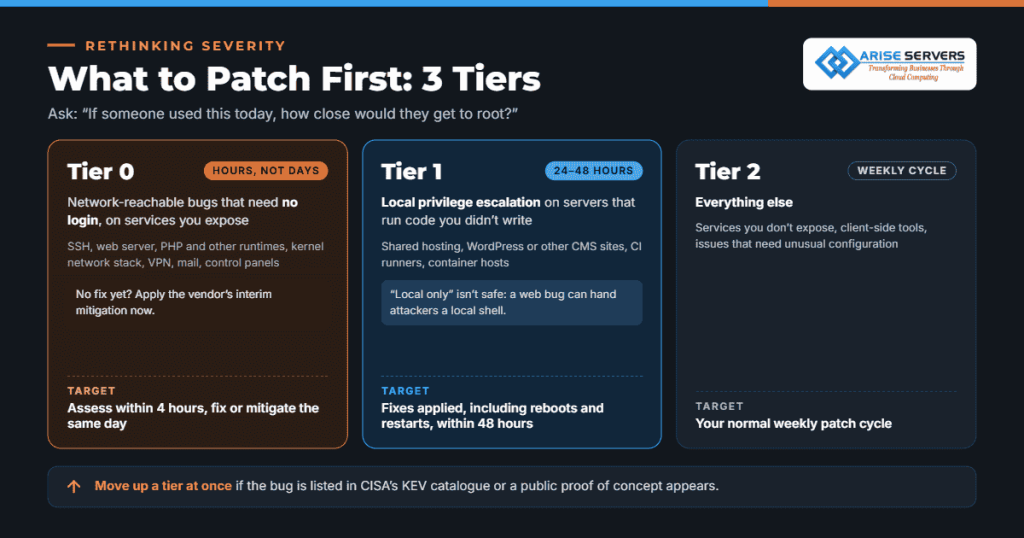
Tier 0: hours, not days. Anything an attacker can reach over the network without logging in, on a service you actually expose. Think SSH, your web server, PHP or other runtimes behind it, the kernel’s network stack, VPN endpoints, mail servers and control panels. If it’s pre-auth and reachable, it goes now. If the fix isn’t out yet, apply the vendor’s interim mitigation now.
Tier 1: within 24–48 hours. Local privilege escalation bugs on any server that runs code you didn’t write: shared hosting, WordPress or other CMS sites, CI runners, container hosts. 2026 proved that “local only” is not reassuring when a web bug can hand an attacker a local shell. Copy Fail, Dirty Frag and Fragnesia were all “local” bugs. All of them were used in real attacks.
Tier 2: the normal weekly cycle. Everything else: bugs in services you don’t expose, client-side tools, and issues that need unusual configuration.
Two signals should bump anything up a tier straight away: the bug shows up in CISA’s KEV catalogue, or a public proof of concept appears. Either one means the clock has already started.
Read Also: DDoS Protection for Servers: How to Stay Online When Traffic Turns Hostile
Know what you’re running before the advisory lands
You can’t patch fast if the first hour goes on working out which servers are affected. Keep a simple inventory that answers four questions for every machine:
- Which kernel is it running right now? (Not which one is installed.)
- Which internet-facing services does it expose?
- Which major runtimes are on it (PHP, Node, Python, Java) and at which versions?
- Who can deploy code or upload files to it?
The commands are boring, which is good. uname -r gives the running kernel. ssh -V, php -v, httpd -v or nginx -v give the service versions. ss -tlnp shows what’s listening. Put the output somewhere central, even a spreadsheet, and refresh it automatically. When a new CVE drops, you want to filter a list, not log into twenty machines by hand.
This is the same discipline we covered in our post on why 53% of hosting security incidents start with outdated software. The difference in 2026 is that the inventory has to be ready before the advisory, because there’s no longer time to build it after.
Build an emergency patching process you’ve actually rehearsed
Most teams have a maintenance window. Few have a tested emergency path. Here’s a lean version that works for small teams.
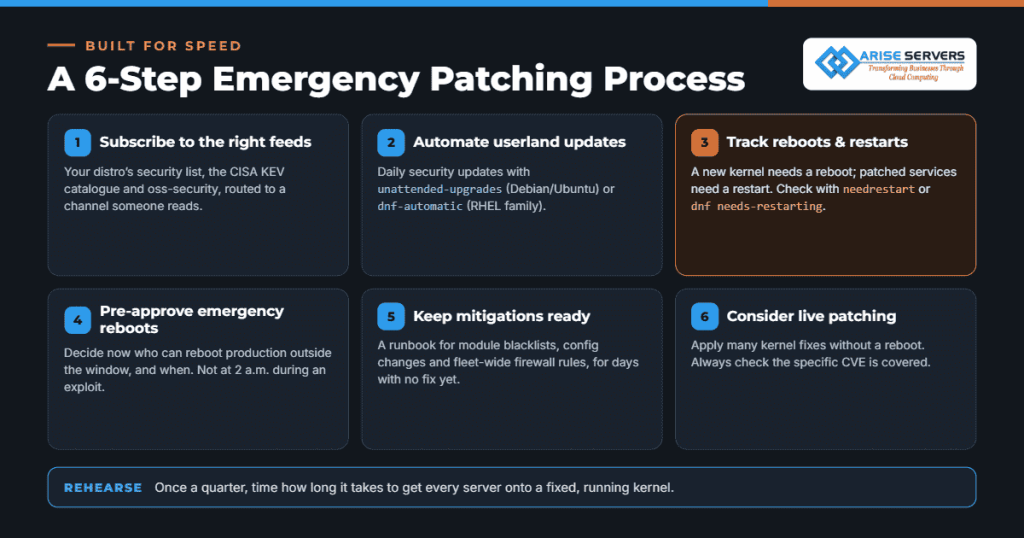
1. Subscribe to the right feeds. Your distribution’s security announcement list, the CISA KEV catalogue, and the oss-security mailing list cover most of what matters for Linux servers. Route them to a channel someone actually reads.
2. Automate security updates for userland. On Debian and Ubuntu, unattended-upgrades can apply security updates daily. On RHEL-family systems, dnf-automatic does the same job. Library and service fixes then go in without anyone waiting for a window.
3. Track reboots and restarts separately. This is where many “patched” servers are still vulnerable. A new kernel does nothing until you boot into it. A patched OpenSSL or OpenSSH does nothing until the services using it restart. Check:
# Debian / Ubuntu
cat /var/run/reboot-required.pkgs 2>/dev/null
sudo needrestart -r l

# RHEL / AlmaLinux / Rocky
sudo dnf needs-restarting -r
sudo dnf needs-restarting -s
The SSHole advisory made this point directly: after updating OpenSSH, you had to restart sshd, because the running daemon kept the old binary until then.
4. Pre-approve emergency reboots. Decide now who can reboot a production server outside the window, and under what conditions. Arguing about it at 2 a.m. while an exploit is public is the worst time.
5. Keep mitigations ready for when a fix isn’t out. Vendors often publish a stopgap before the patch: a module to unload, a config line, a firewall rule. In 2026, those stopgaps included blacklisting the esp4, esp6 and rxrpc modules for the Dirty Frag family, an nftables rule dropping IPv4 packets with IP options for CVE-2026-98432, and turning off password authentication for SSHole. Keep a short runbook of “how to apply a module blacklist” and “how to push a firewall rule fleet-wide,” so you’re not working it out from scratch each time.
6. Consider kernel live patching. Services such as Canonical Livepatch, Red Hat’s kpatch, TuxCare’s KernelCare and SUSE Live Patching can apply many kernel fixes without a reboot. They don’t cover every bug, so always check the specific CVE is included. For servers that are hard to reboot, though, they shorten the window a lot.
When you’re too late: capture first, then patch
Fast patching assumes you got there before the attacker. Sometimes you won’t. The 2026 page-cache bugs added a twist that every admin should know about.
Copy Fail, Dirty Frag and Fragnesia all work by changing the copy of a file held in memory, not the file on disk. The on-disk /usr/bin/su stays clean while the cached version is the one that runs. That means file-integrity tools that hash files on disk may see nothing wrong. It also means a reboot wipes the evidence. Researchers analysing the PHP2Shell and Fragnesia chain gave the advice plainly: if you suspect a host was hit, capture memory before you patch or reboot.
So the order on a suspected compromise is:
- Isolate the host from the network if you can do it without losing access.
- Capture memory and key logs.
- Then patch, rebuild or reboot.
- Rotate any credentials the host held, especially SSH keys, database passwords and directory service accounts.
If you need a starting point for the investigation itself, our guide on how to detect malware on a Linux VPS covers the first checks. Good backups also matter here. A compromised host is often faster to rebuild than to clean, and the 3-2-1 backup rule is what makes a rebuild a calm afternoon instead of a crisis.
Shrink what attackers can reach in the first place
The fastest patch is the one you don’t need. Every service you don’t expose and every module you don’t load is one less advisory that lands in Tier 0.
A few habits pay off over and over:
- Turn off what you don’t use. If nothing on a server terminates IPsec, it doesn’t need ESP modules loaded. If you don’t use RxRPC (most web servers don’t), blacklist it.
- Restrict unprivileged user namespaces where you can. Several 2026 kernel exploits relied on them to gain extra kernel capabilities. Some distributions already limit them through AppArmor or sysctl settings. Test before you change this, because some container tools rely on it.
- Keep SSH off the open internet where possible. Use a VPN, a bastion host, or at least key-only login with password authentication disabled.
- Separate the web user from everything else. If PHP is compromised, the attacker should land in an account that can’t read other sites’ files or database credentials.
Our step-by-step Linux hardening checklist goes through these in more detail.
Using AI on the defending side
If attackers can use language models to read patches, so can you. Anand’s advice to defenders included using models to analyse patch diffs, scan dependencies and check that patches actually landed. In practice, small teams can use AI tools to:
- Summarise a long vendor advisory into “am I affected, and what do I do?”
- Turn an advisory into a checklist of commands for your specific distro.
- Review your inventory output and flag which servers match an affected version range.
Treat the output as a draft to verify, not as an answer. A model that confidently gives you the wrong fixed kernel version is worse than no help at all. Always check against the vendor’s own advisory.
VPS Server Plans
An ideal VPS solution for modern projects combines strong security, high-speed performance, and flexible, scalable configurations to match your evolving requirements.
A realistic target for small teams
Most small businesses don’t have a 24/7 security operations centre, and they don’t need one to do better. A practical goal for 2026 looks like this:
- Tier 0 advisories assessed within 4 hours of publication, with either the fix or the mitigation applied the same day.
- Tier 1 fixes applied, including reboots and restarts, within 48 hours.
- Everything else on a weekly cycle.
- One rehearsal per quarter where you pretend a critical kernel bug just dropped and time how long it takes to get every server onto a fixed, running kernel.
If that sounds like more than your team can carry, that’s a sign to share the load. Managed Linux server administration or a dedicated server management arrangement can take the monitoring and emergency patching off your plate.

The bottom line
The patch window didn’t close because attackers got smarter. It closed because the tools that read code got much faster, and those tools are available to everyone. A patch is now a public hint, and someone will act on that hint within hours.
The response isn’t panic. It’s preparation: know what you run, sort advisories by real-world reach rather than score alone, automate what you can, rehearse the parts you can’t, and keep mitigations ready for the days before a fix arrives. Teams that do those things will still have time. They’ll just be using it differently.
FAQ’s
Visit Our Other Server Locations
Explore our global dedicated server locations with high performance, strong security, and scalable configurations tailored for your business needs.