
Quick answer: On 18 November 2026, nginx released 1.30.7 (stable) and 1.31.9 (mainline) with fixes for ten vulnerabilities. F5 scores five of them Critical (9.2 on CVSS v4.0). The most widely reachable one, CVE-2026-123007, only needs HTTP/2 to be switched on. If you run nginx, update to a fixed package and restart it. A reload isn’t enough. If you can’t update today, the steps below show which stopgaps work for which bug.
nginx sits in front of a huge share of the web. It terminates TLS, serves static files, balances load and proxies requests to PHP, Node and Python apps. So when a single release fixes ten security issues at once, it’s worth slowing down and working out which of them actually apply to your servers.
That’s what this guide does. It goes through what was fixed, which configurations are exposed, how to check your own setup, how to patch on the common platforms, and what to do if you can’t patch right away.
What happened
The November release came out on two branches at once:
- nginx 1.30.7 (stable) with 9 security fixes
- nginx 1.31.9 (mainline) with 10 security fixes, including one bug that only exists in recent mainline builds
F5, which maintains nginx and acts as the CVE authority for it, rated five of the bugs Critical: 9.2 on CVSS v4.0 and 8.1 on the older CVSS v3.1 scale. In the worst case, a remote attacker with no login can crash an nginx worker process. If memory-layout protection (ASLR) is disabled or bypassed, they may be able to run code with that worker’s privileges.
That ASLR caveat sounds reassuring. It shouldn’t be. According to TuxCare’s analysis, every working exploit described so far gets around ASLR by using the bug itself to leak memory addresses.
The research firm Xint found the five critical bugs and named the set “nginx2root.” The name comes from Xint’s demonstration. It paired the nginx code execution with a separate Linux kernel use-after-free in the SCTP protocol code, which turned a worker-level foothold into root on the host, even from inside a Docker container. Xint says the kernel bug dates back to Linux 4.15 and is holding back details until a kernel fix exists. Updating nginx does not fix the kernel bug, but it does remove the first step of the chain.
If that pattern sounds familiar, it should. A network-facing bug gives the attacker a foothold, and a kernel bug turns it into root. It’s the same shape as the PHP2Shell and Fragnesia chain we covered recently. We go through why remote and local bugs need to be patched together in our pillar post, The 30-Minute Patch Window [pillar link].
Exploitation status: As of 18 November, CISA’s Known Exploited Vulnerabilities catalogue didn’t list these bugs, and CERT-EU had no reports of attacks in the wild. That isn’t the same as safe. Rapid7 has published a proof of concept for CVE-2026-123007 that works against a fresh nginx 1.31.8 container, although it needs roughly 128 GB of HTTP/2 traffic over a single connection. Xint says its own exploit works under real traffic and across several cloud providers, but it hasn’t released the code.
There’s also a bigger trend behind this release. According to Xint, nginx’s security advisory list had recorded 26 new vulnerabilities in 2026 by 17 November, compared with just two in all of 2025. nginx hasn’t suddenly become sloppy. It’s being examined much more closely than before, and AI-assisted code review is a big part of why.
VPS Server Plans
An ideal VPS solution for modern projects combines strong security, high-speed performance, and flexible, scalable configurations to match your evolving requirements.
Who’s affected: it depends on what you’ve switched on
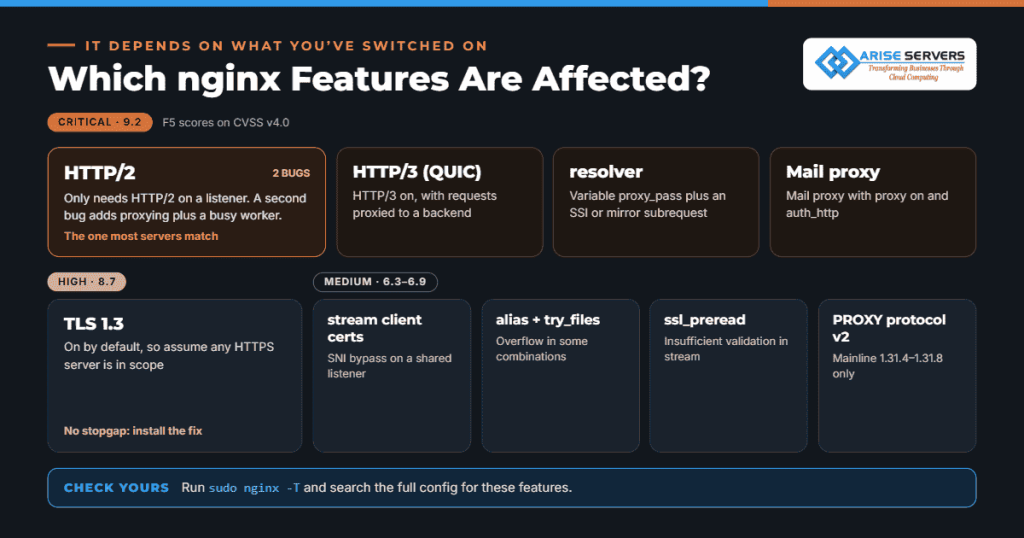
Almost every bug in this release lives in a specific nginx feature. That’s good news, because it means you can work out your real exposure from your configuration, not just your version number.
If you installed nginx from nginx.org or built it from source, the fixes start at 1.30.7 on stable and 1.31.9 on mainline. Distribution packages backport the fixes to older version numbers, which is covered in the patching section below.
Here’s the full list, grouped by the feature that triggers each bug:
| CVE | Feature | What triggers it | Affected from | F5 score (v4.0) |
|---|---|---|---|---|
| CVE-2026-123007 | HTTP/2 | HTTP/2 enabled on a listener. Flow-control accounting error that leads to a heap out-of-bounds write | 1.9.5 | 9.2 Critical |
| CVE-2026-123633 | HTTP/2 | HTTP/2 enabled, nginx proxying to a backend, and a worker running short of worker_connections | 1.19.7 | 9.2 Critical |
| CVE-2026-121810 | HTTP/3 (QUIC) | HTTP/3 enabled with requests proxied to a backend | 1.25.0 | 9.2 Critical |
| CVE-2026-123634 | resolver | A resolver, a proxy_pass target built from variables, and an SSI or mirror subrequest resolving the same name | 0.6.18 | 9.2 Critical |
| CVE-2026-113425 | Mail proxy | nginx used as a mail proxy with proxy on and auth_http | 0.5.33 | 9.2 Critical |
| CVE-2026-118899 | TLS 1.3 | TLS 1.3 on an ssl listener in the http block. A worker can hang in an infinite loop while reading a request body | 1.13.0 | 8.7 High |
| CVE-2026-120967 | stream | SNI bypass of client-certificate checks on a shared stream listener | 1.25.5 | 6.3 Medium |
| CVE-2026-125283 | alias + try_files | Buffer overflow in certain alias and try_files combinations | 0.9.6 | 6.9 Medium |
| CVE-2026-123640 | stream ssl_preread | Insufficient validation in ssl_preread | 1.15.2 | 6.9 Medium |
| CVE-2026-120993 | PROXY protocol v2 | NULL pointer dereference. Mainline 1.31.4 to 1.31.8 only, per nginx.org | 1.31.4 | 6.9 Medium |
A few things worth noticing in that table.
CVE-2026-123007 is the one that matters for most people. It only needs HTTP/2 to be on. That’s the default advice for any modern HTTPS site, so a large share of nginx servers on the internet match it. Xint says the bug has been in the code since nginx first added HTTP/2 in 2015.
The CVE-2026-123633 condition is about load, not just config. It needs HTTP/2, a reverse-proxy setup (nginx passing requests to PHP-FPM, Node, Python or another backend), and a worker that runs low on available connections. A static site that only serves files is outside its conditions. A busy reverse proxy is exactly the kind of server that hits connection limits.
Old distribution versions aren’t automatically safe. Ubuntu 22.04 ships nginx 1.18.0. That’s below the 1.19.7 starting point for CVE-2026-123633, but well inside the range for CVE-2026-123007. Every “affected from” version in the table is years old, so nearly every nginx install is in range of at least one bug.
Severity labels disagree. nginx.org’s own advisory list rates CVE-2026-123007, the mail proxy bug and the TLS 1.3 bug as “major”, and the rest as “medium” or “minor”. F5’s CVSS scores put five bugs at Critical, including two that nginx.org calls medium. Don’t let the softer label slow you down. If your config matches the trigger, treat it as urgent.
NGINX Plus is affected too. F5 lists fixes in NGINX Plus 37.0.8.1 and 37.3.0.1. TuxCare noted that no fix was listed for the older R34 to R36 releases at the time. If you run Plus, check F5’s advisory for your exact product.
Read Also: Page-Cache Exploits Explained: Copy Fail, Dirty Frag and Fragnesia
How to check your own server in five minutes
These checks are all read-only. They don’t change anything, so you can run them on production.
1. Find the version, but don’t trust it on its own.
nginx -vIf you use nginx.org packages or your own build, this is enough. You need 1.30.7 or later on stable, or 1.31.9 or later on mainline.
On Ubuntu, Debian, AlmaLinux and most other distributions, it’s not enough. Distributions backport security fixes into their existing version, so a fully patched Ubuntu 24.04 server will still say nginx/1.24.0. Check the full package revision instead:
# Debian / Ubuntu
dpkg -l | grep nginx

# RHEL / AlmaLinux / Rocky
rpm -qa | grep -i nginx
Compare the revision with your distribution’s security notice. The next section has the minimum versions for Ubuntu and Debian.
2. See which risky features your config actually uses.
nginx -T prints your full running configuration, including every included file. Search it for the features that appear in the CVE table:
sudo nginx -T 2>/dev/null | grep -nE 'http2|quic|http3|^\s*mail\s*\{|auth_http|resolver|mirror|ssi on|proxy_protocol|ssl_preread|try_files|alias'Here’s how to read the results:
http2on alistenline, orhttp2 on;, means you’re in scope for CVE-2026-123007. If you also haveproxy_passorfastcgi_pass, CVE-2026-123633 applies as well.quicorhttp3means HTTP/3 is on, and CVE-2026-121810 applies if you proxy.- A
mail { }block withauth_httpmeans you’re running the mail proxy. resolvertogether withmirrororssi on, and aproxy_passthat uses a variable, matches CVE-2026-123634.aliasneartry_filesin the same location is worth a closer look for CVE-2026-125283.
TLS 1.3 is enabled by default on modern builds. Assume CVE-2026-118899 applies to any HTTPS server unless you’ve explicitly limited ssl_protocols.
3. Check whether HTTP/2 support is compiled in.
nginx -V 2>&1 | tr ' ' '\n' | grep http_v2Source builds only include HTTP/2 if they were configured with --with-http_v2_module. Distribution and nginx.org packages almost always include it. If the module isn’t there, the two HTTP/2 bugs can’t be reached, but you should still update for the others.
4. Don’t forget the nginx you didn’t install yourself.
nginx hides in a lot of places: Docker images, Kubernetes ingress controllers, control panels, appliances and app bundles. Run docker images | grep -i nginx on container hosts, and check which nginx version your ingress controller ships. Many of these update on their own schedule, not your distribution’s.
How to patch, platform by platform
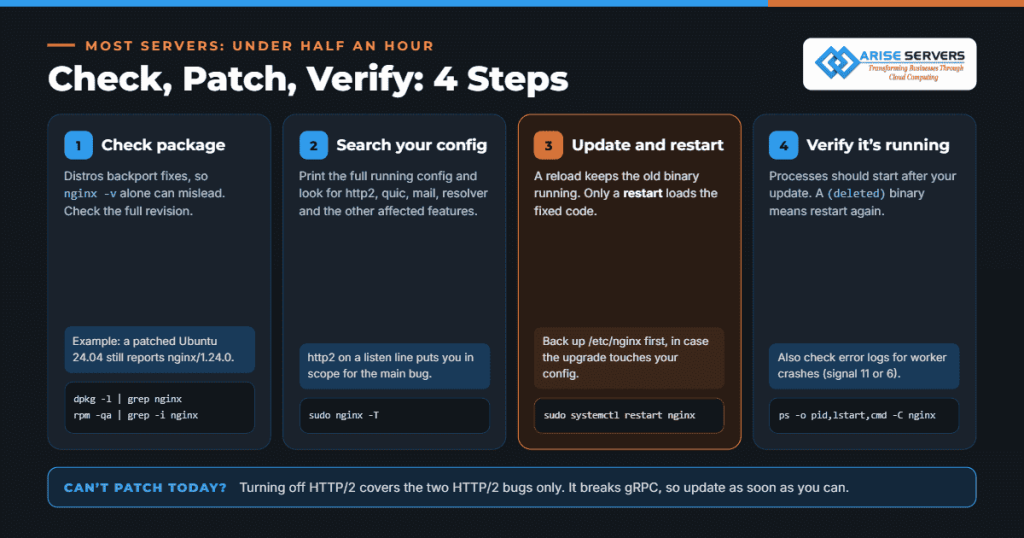
The fix itself is simple: install the patched package and restart nginx. Take a backup or snapshot first if your setup allows it, and keep a copy of /etc/nginx in case a package upgrade touches your config.
One rule applies everywhere: restart, don’t just reload. nginx -s reload or systemctl reload nginx re-reads the configuration, but it doesn’t replace the running nginx binary in memory. Your old, vulnerable workers can keep running. A full restart stops them and starts the new binary.
Ubuntu
Ubuntu fixed eight of the issues in USN-9159-1 on 19 November. The notice advises updating all packages rather than picking individual ones, so on a systemd server:
sudo apt update && sudo apt upgrade && sudo systemctl restart nginxThen confirm your package is at or above the fixed revision:
| Ubuntu release | Minimum nginx package |
|---|---|
| 26.10 | 1.30.4-7ubuntu1.2 |
| 26.04 LTS | 1.28.3-2ubuntu1.13 |
| 24.04 LTS | 1.24.0-2ubuntu7.20 |
| 22.04 LTS | 1.18.0-6ubuntu14.23 |
| 20.04 LTS | 1.18.0-0ubuntu1.7+esm5 (Ubuntu Pro) |
| 18.04 LTS | 1.14.0-0ubuntu1.11+esm6 (Ubuntu Pro) |
Ubuntu 20.04 and 18.04 get these fixes only through Ubuntu Pro. The notice also covers 16.04 and 14.04 under the Legacy Support add-on.
One gap to watch: as of 19 November, Ubuntu still listed CVE-2026-125283 (the alias + try_files overflow) as vulnerable. If your config uses that combination, check the CVE’s tracker page for an update, and apply the config workaround in the next section in the meantime.
Debian 12 and 13
Debian’s tracker showed the critical issues as unfixed on 19 November, but updates have landed since. For CVE-2026-123007, the tracker now lists:
- Debian 12 (bookworm): fixed in
1.22.1-9+deb12u11(DLA-4918-1) - Debian 13 (trixie): fixed in
1.26.3-3+deb13u11(DSA-6642-1)
sudo apt update && sudo apt upgrade && sudo systemctl restart nginx
dpkg -l | grep nginx
Debian tracks each CVE separately, so check the security tracker entry for each one that matches your config before you call a server done.
AlmaLinux, Rocky and other RHEL-family systems
AlmaLinux reports fixes for the five critical issues on its supported nginx module streams for AlmaLinux 8, 9 and 10. The old default 1.14 stream on AlmaLinux 8 is retired. If you’re still on it, you won’t get fixes and need to switch to a supported stream:
sudo dnf module list nginx          # see which stream you're on
sudo dnf upgrade nginx
sudo systemctl restart nginx
Follow AlmaLinux’s own instructions for moving streams, since that step can change your nginx version significantly. On the day of release, Red Hat rated RHEL 8, 9 and 10 affected (Critical) with errata still pending. Watch your vendor’s advisory for the fixed package.
nginx.org packages and source builds
Update to 1.30.7 or later on stable, or 1.31.9 or later on mainline. If you built from source, rebuild with the same ./configure options. nginx -V shows them. Then restart.
Containers and Kubernetes
The nginx inside an image doesn’t change until you rebuild or pull a new one. Rebuild your images with --pull against a patched base, redeploy, and check that old pods have actually been replaced. Ingress controllers bundle their own nginx, so check the controller project’s release notes for a version that includes 1.30.7 or 1.31.9 fixes.
Other distributions
Alpine published 1.30.7-r0 to its edge branch first, so check your release branch. For Amazon Linux, SUSE and everything else, check your distribution’s security advisory and install the fixed package as soon as it’s out. Our post on why 53% of hosting security incidents start with outdated software covers how to stay on top of updates like this across a whole fleet.
Dedicated Server Plans
Arise Dedicated Servers deliver powerful performance, reliable infrastructure, and flexible resources for businesses, high-traffic websites, applications, and demanding workloads.
If you can’t update yet: stopgaps that actually work
Sometimes the fixed package isn’t out for your platform yet, or a change freeze means you can’t restart today. These configuration changes reduce your exposure in the meantime. None of them replace the update.
HTTP/2 bugs (CVE-2026-123007 and CVE-2026-123633)
CERT-EU says disabling HTTP/2 on exposed listeners temporarily mitigates both. F5’s own bulletins don’t list a mitigation for these two, so treat this as a stopgap, not a fix.
How you turn it off depends on how it was turned on. With the older syntax, remove the http2 parameter from the listen line:
# before
listen 443 ssl http2;

# after
listen 443 ssl;
If you use the standalone directive (available from nginx 1.25.1), set it off in each affected server block:
http2 off;Things to know before you do this:
- Browsers fall back to HTTP/1.1 automatically. Your site keeps working, but pages with many small files may load a little slower.
- gRPC needs HTTP/2. If any service uses
grpc_pass, switching HTTP/2 off on that listener will break it. Patch those servers first instead. - If your site sits behind a CDN, visitors can still get HTTP/2 from the CDN edge while the edge talks to your origin over HTTP/1.1. If you’re not using one yet, our beginner’s guide to CDNs explains how that split works.
HTTP/3 (CVE-2026-121810)
F5 lists no temporary mitigation. If you don’t need HTTP/3, the practical option is to stop serving it: remove the quic listener and the Alt-Svc header that advertises it, so clients stop trying to connect over QUIC.
resolver (CVE-2026-123634)
F5 recommends avoiding SSI and mirror, and avoiding variables in proxied server names. In practice, point proxy_pass at a fixed upstream group instead of a name built from request data. That removes the per-request DNS lookup the bug depends on.
Mail proxy (CVE-2026-113425)
F5 recommends restricting mail proxy listeners to trusted networks. Bind the listener to an internal address or loopback, or limit who can reach it with your firewall.
The lower-severity ones
- Stream client certificates (CVE-2026-120967): set
ssl_verify_client on;on the shared listener’s default server, or give the stream server its own address and port. - PROXY protocol v2 (CVE-2026-120993, mainline only): disable PROXY protocol v2, or turn off both
ssl_session_ticketsandssl_session_cache. - alias + try_files (CVE-2026-125283): use named regex captures in the location and don’t reuse capture variables.
- ssl_preread (CVE-2026-123640): terminate TLS on nginx instead of passing it through.
No stopgap: HTTP/3 and TLS 1.3
F5 lists no temporary mitigation for the TLS 1.3 infinite-loop bug (CVE-2026-118899), and none for HTTP/3 beyond switching the feature off. Turning off TLS 1.3 isn’t a sensible trade for most sites. Install the fixed package as soon as it’s available.
Apply config changes safely
For configuration-only changes, a reload is fine. You’re not replacing the binary. Always test first:
sudo nginx -t && sudo systemctl reload nginxnginx -t catches syntax errors before they take your site down. If it fails, nothing is reloaded and the running config stays in place.
Verify the fix is actually running
After patching, prove that the new binary is the one serving traffic. Two quick checks:
# When did the nginx processes start? They should be newer than your update.
ps -o pid,lstart,cmd -C nginx

# Is the running master still using a binary that's been replaced on disk?
sudo ls -l /proc/$(pgrep -o -x nginx)/exe
If the second command shows (deleted) at the end of the path, the process is still running the old binary from before the upgrade. Restart nginx and check again.
It’s also worth searching your error log for worker crashes from the last few weeks. Memory-corruption bugs like these usually show up as segfaults first:
sudo grep -E 'exited on signal (11|6)' /var/log/nginx/error.log*The odd crash can have many causes. A cluster of them, especially on an internet-facing HTTP/2 server, deserves a closer look at the access logs from that time.
Harden so the next nginx bug hurts less
nginx will have more advisories. The year’s count makes that clear. A few habits limit the damage when the next one lands.
Run workers as an unprivileged user. The user directive in nginx.conf should name a dedicated account such as nginx or www-data, never root. Code execution “with the worker’s privileges” is far less dangerous when those privileges are minimal.
Turn off features you don’t use. HTTP/3, the mail proxy, SSI, mirror and the stream module each showed up in this release. If a server doesn’t need one, remove it from the config. Every feature you don’t run is an advisory you can skim past.
Close the kernel half of the chain. Xint’s nginx2root demo needed the Linux SCTP bug to reach root. Most web servers never use SCTP. If yours doesn’t, block the module with a modprobe rule (install sctp /bin/false in a file under /etc/modprobe.d/). This won’t unload a module that’s already loaded, and it doesn’t help if SCTP is built into your kernel, so pair it with normal kernel updates. Our Linux server hardening checklist covers the rest of this base layer.
Watch for abusive connections. The public HTTP/2 proof of concept pushes a very large amount of traffic down a single connection. Connection limits, sensible timeouts and network-level DDoS protection won’t fix the bug, but they make that kind of sustained abuse easier to spot and harder to keep up.
Know your web server’s update path. Whichever server you run, the fix only matters if you can ship it quickly. Our comparison of LiteSpeed, Apache and Nginx covers how each one fits into a typical stack. If patching and restarting web servers across many machines is eating your team’s time, managed server management is one way to hand the routine work off.

The takeaway
This release isn’t a reason to panic about nginx, but it’s a clear reason to act this week. Five Critical bugs, a working public proof of concept for the most common one, and a demonstrated route from nginx to root together add up to a high-priority update.
The good news is that the response is simple. Check your package revision, not just nginx -v. Search your config for the affected features. Install the fixed package and restart, don’t reload. Use the stopgaps only to cover the gap until the package arrives. Most servers can be done in under half an hour, and the ones that can’t are usually the ones that most needed a written patching plan anyway.
FAQ’s
Visit Our Other VPS Server Locations
Explore our global VPS server locations with high performance, full root access, enterprise-grade security, and scalable hosting solutions for your business.